Azure Container Instances
- Rule: Azure Container Instances (ACI) may not be exposed directly to the public internet and must be deployed into a private subnet within the spoke VNet.
- Action: Deploy ACI container groups into a delegated subnet (
Microsoft.ContainerInstance/containerGroups) in the spoke VNet with no public IP, routing outbound traffic through the hub firewall via UDR.
Note
Azure Container Instances (ACI) is the Azure service for running containers, and a container group is the actual resource you deploy (whether manually or as the default when using ACI). This document uses both terms interchangeably where context allows.
- Container groups must be deployed with VNet integration into a dedicated delegated subnet in the spoke VNet. Public IP assignment is not permitted.
- The delegated subnet must have a User Defined Route (UDR) directing outbound traffic (
0.0.0.0/0) to the hub firewall. - NSGs on the container group subnet should follow least privilege and allow only required inbound traffic from approved sources (for example, campus network ranges, VPN, internal load balancers, or other spoke resources).
- Container images should be pulled from a private registry (such as Azure Container Registry with a Private Endpoint) rather than public registries where possible. Outbound pulls from public registries will traverse the hub firewall and may be subject to filtering.
- For internet-facing application traffic, work with Cloud Services to configure hub-managed ingress via the shared Azure Front Door (AFD) instance, fronted by an internal Load Balancer or Application Gateway in your spoke VNet that targets the container group’s private IP.
- Administrative access (e.g.
az container exec) traverses the Azure control plane and does not require public network exposure on the container group itself. See Access Methods for details. - Container groups must use a SKU and OS type that supports VNet integration. Confirm support at Virtual network scenarios for ACI.
Implementation Pattern
Private Container Group with VNet Integration
The standard pattern for ACI in the TAMU managed network is a container group deployed into a delegated subnet of the spoke VNet, with outbound traffic forced through the hub firewall and inbound access provided either by direct private IP access from within the VNet or via an internal load balancer for higher availability.
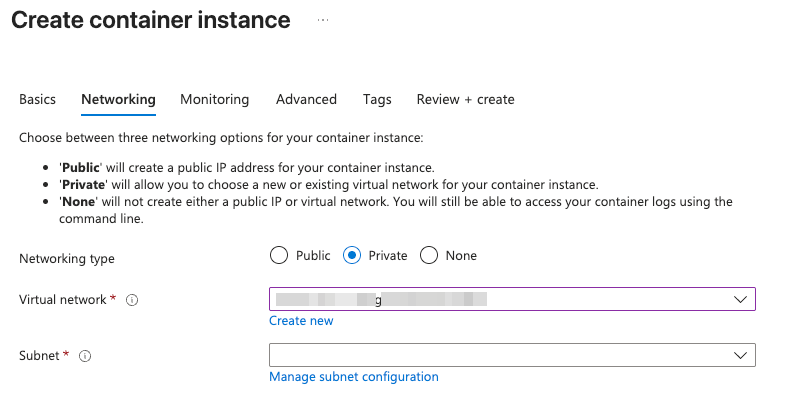
You may follow the Microsoft documentation for deploying container instances into an Azure virtual network as a reference. The key points for the TAMU managed network are:
- Create a dedicated subnet in your spoke VNet delegated to
Microsoft.ContainerInstance/containerGroups. This subnet cannot host other resource types. - Associate the spoke’s UDR (which routes
0.0.0.0/0to the hub firewall) with the delegated subnet. - Apply an NSG to the delegated subnet that permits only the inbound traffic your application requires from approved sources.
- Deploy the container group with
ip_address_type = "Private"and reference the delegated subnet. - Pull container images from a private Azure Container Registry where possible. If using a private ACR, ensure the ACR has a Private Endpoint in the spoke VNet (or another reachable VNet) and that the ACI managed identity or admin credentials have pull rights.
- Verify outbound connectivity by reviewing hub firewall logs to confirm traffic from the container group is being inspected as expected.
To expose the container group to the internet, it must be done through the centralized hub services. Submit a Cloud Services request specifying the custom domain (if any), origin hostname (typically an internal load balancer or App Gateway in your spoke fronting the container group), and any required WAF or routing rules for the AFD configuration.
Internet-Facing Ingress
ACI does not natively support Azure Front Door Private Link as an origin. To publish a containerized workload to the internet:
- Deploy an internal-only Application Gateway or internal Load Balancer in your spoke VNet that targets the private IP(s) of your container group(s).
- Submit a Cloud Services request to configure AFD with the App Gateway / Load Balancer as the origin via Private Link.
For more information, see Access Methods.
Migrating
To convert an existing public ACI deployment to private:
- Create the delegated subnet in your spoke VNet if it does not already exist, and associate the hub firewall UDR.
- Redeploy the container group into the delegated subnet with
ip_address_type = "Private". ACI does not support converting an existing container group’s network configuration in place — a redeploy is required. - Update any DNS records or application configurations that previously pointed to the public ACI FQDN/IP to use the new private IP or the internal load balancer fronting the container group.
- Validate connectivity from within the VNet (e.g. from a VM, via Azure Bastion, or via campus VPN) before decommissioning the public container group.
- Submit a Cloud Services request to configure an AFD origin and endpoint if the workload needs to remain publicly accessible.
Note
ACI container groups are immutable with respect to network configuration. Plan for a redeploy and a brief outage when migrating from public to private networking.
Example Terraform Snippets
Delegated Subnet for ACI
resource "azurerm_subnet" "aci" {
  name                 = "snet-aci"
  resource_group_name  = azurerm_resource_group.rg.name
  virtual_network_name = azurerm_virtual_network.spoke.name
  address_prefixes     = ["10.x.x.x/28"]

  delegation {
    name = "delegation"
    service_delegation {
      name = "Microsoft.ContainerInstance/containerGroups"
      actions = [
        "Microsoft.Network/virtualNetworks/subnets/action",
      ]
    }
  }
}
Container Group with Private IP
resource "azurerm_container_group" "workload" {
  name                = "ci-workload"
  location            = azurerm_resource_group.rg.location
  resource_group_name = azurerm_resource_group.rg.name
  os_type             = "Linux"

  ip_address_type = "Private"
  subnet_ids      = [azurerm_subnet.aci.id]

  container {
    name   = "app"
    image  = "myregistry.azurecr.io/workload:latest"
    cpu    = "1.0"
    memory = "1.5"

    ports {
      port     = 8080
      protocol = "TCP"
    }
  }

  image_registry_credential {
    server   = "myregistry.azurecr.io"
    username = var.acr_username
    password = var.acr_password
  }
}